
Dec 6, 2012
[ENG] Wide News - behind Best performance, EXO + SHINee (1206)
Do not reupload.
translated and subbed by patata.
source of video : shineeband exo

Dec 3, 2012
[ENG] Patti Kim Show with SHINee - Lucifer + Talk + Sherlock
Do not reupload
translated and subbed by patata
Dec 2, 2012
[ENG] SHINee in Backstage - Patti Kim Show(1202)
Do not reupload.
translated and subbed by patata.
you can watch it with 720(HD)
source of video : DC
Nov 30, 2012
[ENG] ELLE girl game with SHINee - The last volume
Do not reupload
translated and subbed by patata
source : ellejp
Nov 29, 2012
[ENG] Weekly Idol - Tom & Jerry Idol, JongHyun and MinHo(1128)
Do not reupload.
translated and subbed by patata.
Nov 23, 2012
[ENG] Reconstitution of Ranking - The man you wnat to date with?, Onew 4th (1122)
Do not reupload.
translated and subbed by patata.
translated and subbed by patata.
Nov 22, 2012
[ENG] Weekly Idol - Audition-Dol 3rd, JongHyun(1121)
Do not reupload
translated and subbed by patata
Nov 20, 2012
[NOTICE] Patata's New Youtube Channel
https://www.youtube.com/user/patatakim?feature=mhee
My channel was deleted last week.
so I have to create new one.
Guys~ Come and subscribe!!
My channel was deleted last week.
so I have to create new one.
Guys~ Come and subscribe!!
Oct 12, 2012
[Fancam] Stranger & Sherlock by SHINee - ABU Radio Song Festival (1011)
Do not reupload ( You can watch it with 720HD)
Recorded by patata


[ENG] Weekly Idol - HuhDangDol 3rd, Onew (1010)
Do not reupload.
translated and subbed by patata.
We in Korea call the one who does sloppy things 'HuhDang' recently.
Oct 4, 2012
[ENG] Weekly Idol - Family Idol, JongHyun 9th (1004)
Do not reupload.
translated and subbed by patata
Oct 2, 2012
Sep 27, 2012
[ENG] Weekly Idol - Key bringing great honor to his province.(0926)
Do not reupload.
translated and subbed by patata.
Full Support Message for TTBY Cast and Crew
TTBY
supporters please help me to disseminate this Message Poster to reach
SMTOWN and SBS in cheering the TTBY Cast and Crew despite the low
ratings. We, here in International Community are giving them 100%
Support for their effort and har
dwork. Fighting!!!
smtown facebook http://www.facebook.com/smtown
TTBY facebook http://www.facebook.com/smtown
sbs twitter https://twitter.com/sbsnow
with this message:
우리는 지원 아름다운 그대에게!!! http://fc02.devianta...zaa-d5g3hp9.jpg
so they could hear our screams for support :)
Click to view original size

By TTBY Supporters@soompi.com
dwork. Fighting!!!
smtown facebook http://www.facebook.com/smtown
TTBY facebook http://www.facebook.com/smtown
sbs twitter https://twitter.com/sbsnow
with this message:
우리는 지원 아름다운 그대에게!!! http://fc02.devianta...zaa-d5g3hp9.jpg

so they could hear our screams for support :)
Click to view original size

By TTBY Supporters@soompi.com
Sep 26, 2012
Sep 15, 2012
How to Set SHINee's alert bell on KakaoTalk (For Android)
For Android User, You don't need the complicate process like one of iphone.
Step1.
Connect your phone with your computer using USB.
You can see the phone in the folder of 'My computer'.

Step2.
Double Clikc the Icon of your phone.
And you can find the Memory Card.

Step3.
Clikc the icon and there are many folders in Memory Card.

Step4.
You have to make a new folder and name it notifications.
Lastly, All you have to do is just put the SHINee's voices into the folder.

After finishing, you can set the alarm in setting of KakaoTalk.
Good Luck!
posted by patata
Step1.
Connect your phone with your computer using USB.
You can see the phone in the folder of 'My computer'.

Step2.
Double Clikc the Icon of your phone.
And you can find the Memory Card.

Step3.
Clikc the icon and there are many folders in Memory Card.


Step4.
You have to make a new folder and name it notifications.
Lastly, All you have to do is just put the SHINee's voices into the folder.

After finishing, you can set the alarm in setting of KakaoTalk.
Good Luck!
posted by patata
Sep 14, 2012
How to Set SHINee's alert bell on KakaoTalk (For i-phone)
1. Download the program named as 'i-FunBox' from the web
2. Install the program in your computer.
You can choose English version when installing.

3. Connect your I-phone with your computer.
4. Execute iFunBox.
5. You can the menu 'User Application' on the left side.
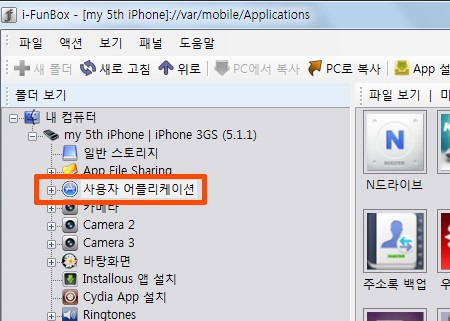
6. Double click the menu.

7. Click the KakaoTalk.
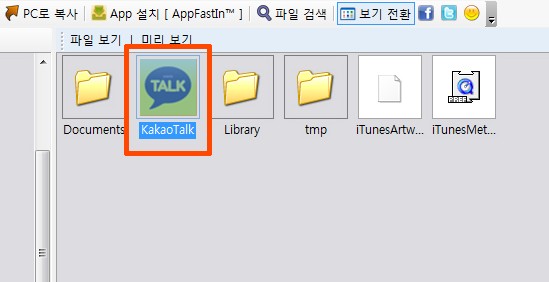
8. You can see 7 files having 'caf' as the extension name.

9. These files are the alarm files.(Don't click any other file)
10. 1.caf - TriAngle
2.caf - Pororong
3.caf - Water Drops
4.caf - Glass bead
5.caf - Horn
6.caf - DingDong
7.caf - feat.Obama
These are the original alarms.
11. First, you have to backup original ones just in case.
12. Drag the 7 files and select.

13. And then, Click the button 'Copy to PC' on the bar above and Save them in your PC.
14. It's time to change them into new alarms.
15. I sent fans wanting to receive JJong,Onew and Taemin's voice files.
(If you want, I'll send you them. email me - patatajkim@gmail.com)
16. Open the folder having the files.
17. Choose 7 files among them.
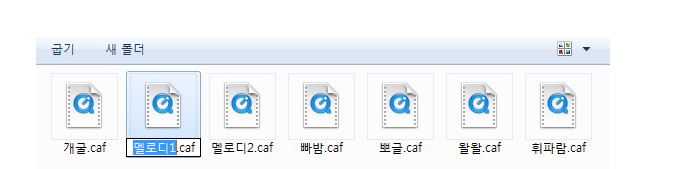
18. And change the names same as the names of the 7 files in iFunBox.
like 1.caf, 2.caf etc...
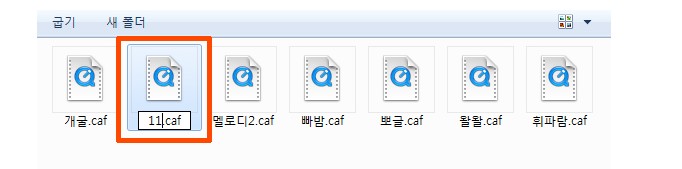
19. Next, Click and Drag the changed file and Cover the file having the same name one by one.

20. Almost done. after the processing, Turn off your iphone and reboot.
21. In the setting menu of KakaTalk, Try touching the files following.
1.caf - TriAngle
2.caf - Pororong
3.caf - Water Drops
4.caf - Glass bead
5.caf - Horn
6.caf - DingDong
7.caf - feat.Obama
22. When you want to hear the alarm bell even if you don't close out of KakaoTalk or when you send the message, follow this way.
Change the short.caf file to the voice bell you want like doing before.
(You have to rename a voice bell file to short.caf then move it onto short.caf like you do thi others.
short.caf file in the second to last row in the iFunBox.
Don't forget to restart your iphone after finishing all of those processes.

P.S. -
Good Luck!! Guys~
I'll post about setting on the Android phone next time.
posted by patata
Sep 12, 2012
Subscribe to:
Posts (Atom)
I found that all you have to do is to change chord.wav file on your facebook of iFunBox.